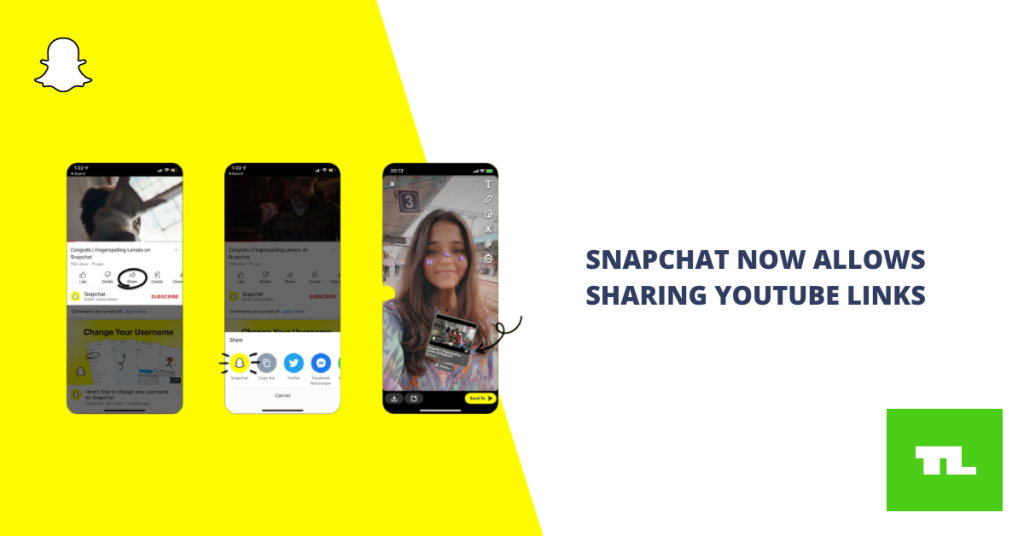
Techlist Staff Posted On April 3, 2022 Snapchat has made it easy to share YouTube videos directly from your snap or story, eliminating the need to copy, paste, and attach the video as a link (via Android Police). Both Android and iOS users can use the feature. All you have to do now is go to YouTube, click the “Share” option, and then choose “Snapchat.” Snapchat will open, and the video will appear as its own sticker in your camera, complete with the video’s name, thumbnail, and creator. After you’ve taken your photo or video, you can play about with the size, rotation, and placement of the sticker on the screen. Anyone who sees your snap or story can open the link and watch the video on YouTube or in their web browser. If you’ve ever tried to incorporate a YouTube video in a Snapchat photo or video, you’ll remember having to copy the link from YouTube and then open Snapchat, where you’d shoot your photo or video, tap the paperclip button, and paste the link in (or give Snapchat access to your clipboard). The video would be shown as a resizeable banner with a small thumbnail and the video’s…
Read More
Snapchat Now Allows Direct Sharing of YouTube Videos – Techlist