
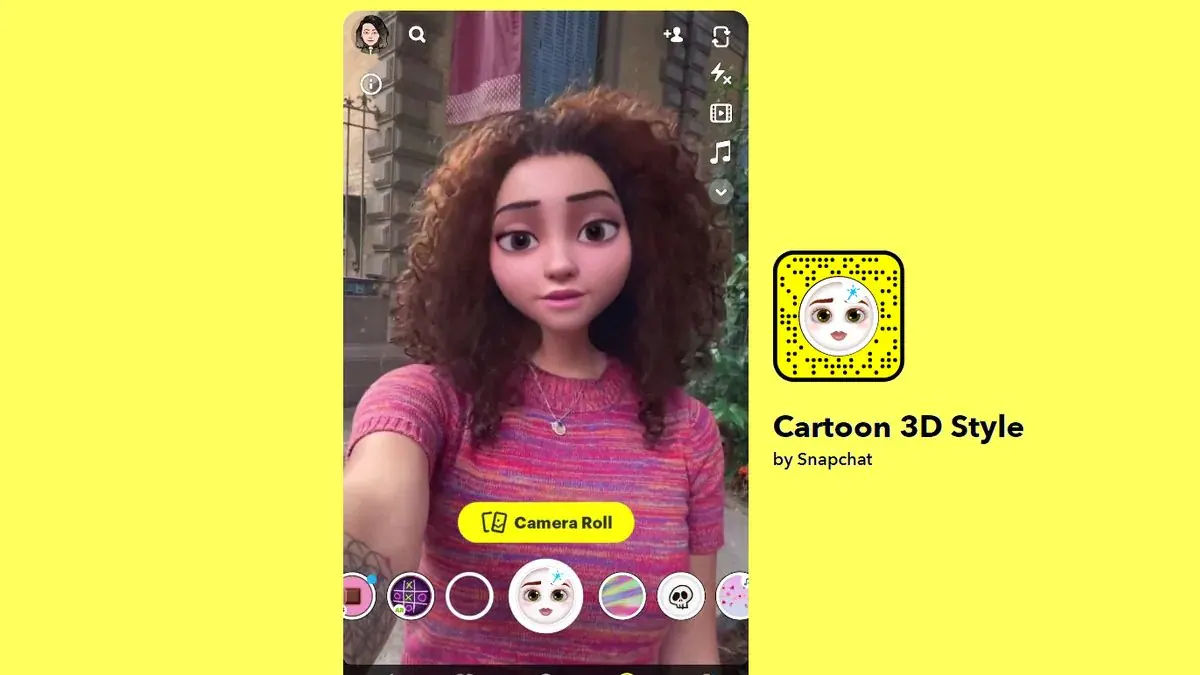
Want to transform your selfies into a doe-eyed Disney character? Here’s a simple step-by-step guide to using 3D Cartoon filter on Snapchat, Instagram. A viral trend has been taking over the internet and if you are confused about what we are talking it’s the Disney Pixar face filter on Snapchat. The social media company has introduced a new Cartoon 3D Style lens that turns your selfies into Disney Pixar characters. The lens can be used both for taking photos or creating videos. Also Read – How to use Snapchat’s viral Cartoon 3D Style Lens Snap cites that since its debut, over 215 million Snapchat folks have been engaged with the new Cartoon 3D Style Lens and that it has been viewed more than 1.7 billion times. This new face filter has no doubt caught the attention of many. You can try the lens on paintings, caricatures, or even your friends (in case you don’t like taking selfies), and transform them into popular doe-eyed Disney princess (or prince). In case you are wondering how to use the trending Disney Face Filter, here’s a simple way. You can have fun with this filter on Instagram as well. Also Read – Instagram will…
Read More

Wednesday, September 30, 2026

Wednesday, September 30, 2026
Disney Pixar Filter: How to get and use the 3D cartoon face filter on Snapchat, Instagram, TikTok

ADVERTISEMENT
- Trending
- Comments
- Latest







We bring you the best news, updates, reviews, and events coverage surrounding the worlds top Social Network Companies.
