
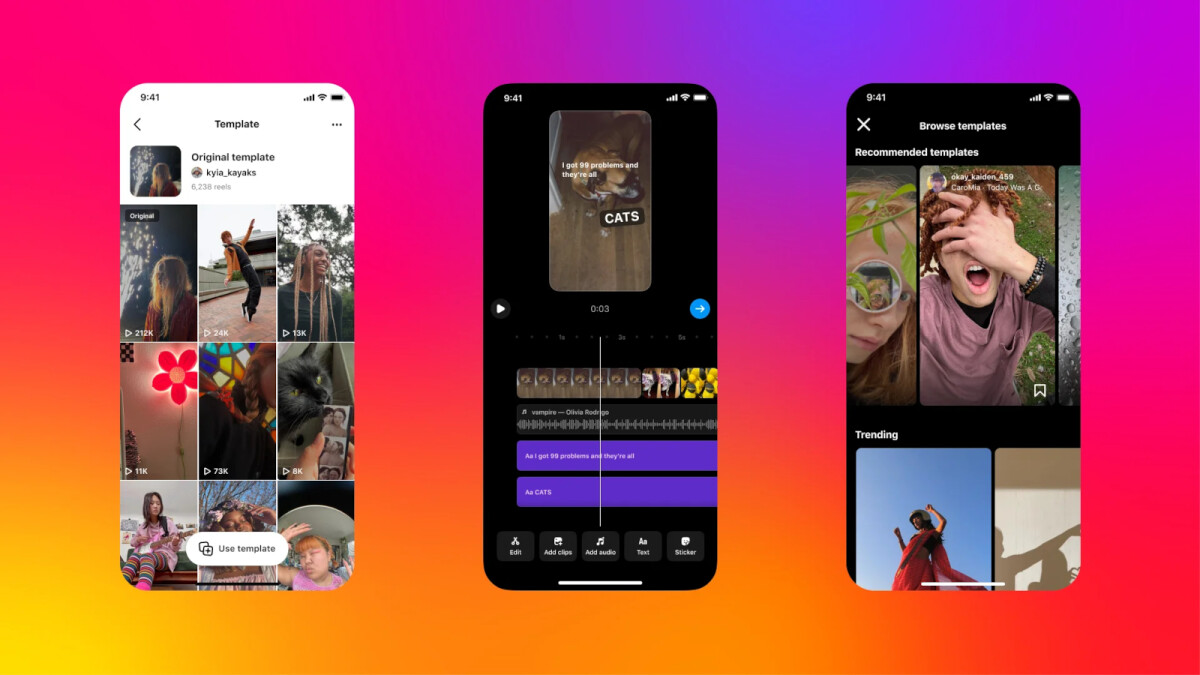
Instagram is bringing its users new features to help them create content faster and easier. With Reels templates, Instagram hopes to bring the right tools to further improve the overall content creation experience on its social app.The latest Instagram update introduces a new and improved Template Browser where users can find templates by category, organized by Recommended, Trending, and templates or audio they saved. To access the new Template Browser before you start creating a reel, here is what you need to do:Tap on the create button from the home pageTap on “REEL”Tap the image in the lower left corner of the screen to open to your camera galleryTap on “Templates”Alternatively, the Template Browser can also be accessed through the Reels Tab by simply tapping on the camera icon, then choosing “Templates.” Once you find a template that you like, tap the “Use Template” button on the reel to start making it your own.The new bundled of tools also comes with the ability to see what templates others have used by tapping on the “Template by” button in the reel, which will redirect you to a page with examples of how people created their own reels starting from a template.In
Read More

Tuesday, September 8, 2026

Tuesday, September 8, 2026
Instagram launches new tools to make it easier to create Reels – PhoneArena

ADVERTISEMENT
- Trending
- Comments
- Latest








We bring you the best news, updates, reviews, and events coverage surrounding the worlds top Social Network Companies.
