Saturday, August 1, 2026

Check Out Upcoming New WhatsApp Features In 2023 – Meta Platforms (NASDAQ:META)

Meta Platforms Inc.-owned META WhatsApp constantly updates the app with new features to keep users hooked onto the service as well as remain competitive. In 2023, upcoming WhatsApp features in 2023 include usernames, blocking screenshots, and more.WhatsApp has increased its pace of feature additions in 2022, from editing messages, chat lock, and voice status to companion mode for multi-device support.Now, we look at all the upcoming new WhatsApp features in 2023.See Also: Keep Prying Eyes Away From Your Personal Messages Using WhatsApp Chat LockUsernamesUsername support in WhatsApp is currently under development, reported WABetaInfo. This will allow users to choose unique usernames, like what is possible on social media like Twitter, Instagram, Facebook, and others.Screenshot BlockingUsers will be prevented from taking a screenshot of photos and videos which are set to ‘view once' by the sender. This feature has been under development for a while but is expected to become available this year.Multi-account SupportWhatsApp has been spotted testing multiple account support within the app. This means users will not have to resort to using clone apps or WhatsApp Business to use the service on multiple numbers on the same phone.Screen Sharing On DesktopFor Windows users of WhatsApp, the messaging service is

Read moreDetails

You can now silence unknown callers on WhatsApp – The Daily Star

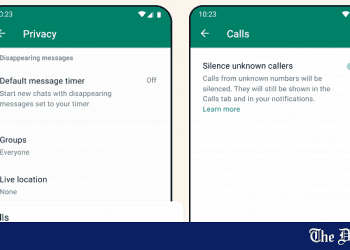
Users can now silence incoming calls of unknown numbers on WhatsApp, as per a new feature recently added to the popular social messaging app. In their official blog, WhatsApp has stated that this new feature aims to provide more privacy to users while giving them more control of incoming calls. To access the 'silence unknown callers' feature, click on the three dots in the main menu of the app and click on 'Settings'. From there, click on 'Privacy'. Scroll down a bit to see the 'silence unknown callers' options under the 'Calls' settings. Turning the option on will make incoming calls from unknown numbers automatically silenced. However, these calls will still be shown in the Calls tab of the main menu as well as in your notifications. Alongside this new feature, WhatsApp has also released a 'privacy checkup' feature. To access this, click on 'Privacy' and then 'Settings'. From there, you should see the option to start a privacy checkup at the very top of the menu. Clicking on 'start checkup' will enable you to manually adjust who can contact you, change how your personal info is shown by the app, add more privacy to your chats, and add more

Read moreDetails

How to edit chats on WhatsApp 2023 – TechCabal

WhatsApp is arguably the most popular messaging platform worldwide, and it offers a wide range of features to enhance your chatting experience. While editing messages after sending them was once impossible, WhatsApp has now joined the likes of Slack as it now allows users to edit their chats, fixing typos, mistakes, or adding missing information. In this article, we will guide you through the process of editing chats on WhatsApp. 1. Update your WhatsApp to get the chats edit feature The first step to take before you can edit your Whatsapp chats is to have the latest Whatsapp version. So head to the app store or Google Play Store and update your WhatsApp. 2. Open Whatsapp and locate the chat you want to edit Launch the WhatsApp application on your smartphone. Once opened, navigate to the chat conversation that contains the message you want to edit. Please note that this feature only works with individual chat messages. In other words, you can’t edit a message sent to a group. So scroll through the chat until you find the specific message you wish to modify. 3. Long-press any of the WhatsApp chats you want to edit To begin editing, long-press on

Read moreDetails

WhatsApp launches new update as scammers 'silenced' from targeting users – Daily Record

WhatsApp has added some new privacy features to limit contact from cyber criminals. From today, users will be able to automatically silence calls from unknown numbers. The company has also introduced a privacy check up to help users' make the most of their settings. Cyber criminals continue to become more tech savvy, bringing their deceptive skills to unsuspecting victims' through their mobile phones. With scammers migrating as far as social media, it's important to protect yourself as much as possible. Available now, the Silence Unknown Callers feature will hide WhatsApp calls made by unfamiliar numbers to the recipient's device to reduce scams and spam contact. However, the notification will appear on your WhatsApp call list, in case it turns out to be from someone important. A statement from the company's blog said: "Protecting the privacy of your messages remains the driving force behind what we’re building at WhatsApp. Cyber criminals have become more tech savvy (Image: Getty Images/Moment RF) "While End-to-end encryption is the foundation to ensure your calls and messages are secure, we continue to add more layers of privacy on top including the recently launched Chat Lock to protect sensitive chats behind a password, Disappearing Messages that vanish

Read moreDetails

WhatsApp to soon launch Instagram-like multiple profiles feature. Here's how it works

WhatsApp is currently developing and testing a feature called 'multiple profiles' that allows a single user to have multiple accounts or profiles, and switch between them, just like Instagram. This is a very useful feature for people with WhatsApp Business Accounts WhatsApp has recently introduced the capability for users to utilize a single account across two devices. However, the messaging platform is now reportedly working on a new feature that will enable the use of multiple WhatsApp accounts on a single device. According to information from WAbetainfo, this feature is currently under development specifically for Android users, suggesting that Android users may be the first to access it upon its release. What is WhatsApp’s multi-profile feature? Once this feature is available, users will have the ability to create and store multiple WhatsApp accounts on a single device. Switching between accounts will be effortless, as the app will retain the account passwords, allowing users to switch with a single tap. A menu will be displayed, presenting a list of the available accounts, and users can simply choose the desired account to access its contents. Related Articles The multi-account feature being developed by WhatsApp is reminiscent of the account-switching functionality found in

Read moreDetails

WhatsApp To Add Screen-Sharing Feature For Video Calls: How It Works – News18

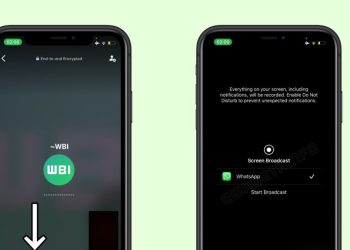
Last Updated: June 19, 2023, 12:34 ISTThe ability to share the content of your screen during a video call is available to some beta testers.When using this feature, everything on your screen, including notifications, will be recorded and shared remotely with the people currently connected to the video call. The Meta-owned instant messaging application WhatsApp is releasing a screen-sharing feature for video calls on its platform. With this feature, users can share the content of their devices during a video call, making it easier to collaborate, demonstrate, and troubleshoot various tasks or issues remotely.“We shared information about a new feature released to some beta testers: the ability to share the device screen. After installing the latest WhatsApp beta for iOS 23.12.0.74 update from the TestFlight app, we can confirm that some beta testers may be able to experiment with the same feature," said WABetaInfo.If the feature is enabled for your WhatsApp account, you will see a new icon at the bottom during a video call: this option allows you to share the content of your screen with everyone on the call.When using this feature, everything on your screen, including notifications, will be recorded and shared remotely with the people currently

Read moreDetails

WhatsApp to soon add support for Meta Quest on Android beta: Report – Mint

Copyright &copy HT Digital Streams Limited All Rights Reserved. WhatsApp is one of the most popular instant messaging apps. The platform keeps bringing new features to its users to enhance the app experience. Now, the instant messaging app may soon offer support for Meta Quest. According to a report by WaBetaInfo, WhatsApp is working to add Meta Quest compatibility on Android beta as a linked device. The report says that it will be possible to link an existing WhatsApp account to a Meta Quest device as it is recognized as official linked device in a future update of the app.  The feature was spotted  through the WhatsApp beta for Android 2.23.12.12 update. As the feature is currently not available on WhatsApp, some users have already attempted to force the installation of WhatsApp on the virtual reality device. With the new feature, it will be possible to natively connect an existing WhatsApp account to a Meta Quest device. The upcoming WhatsApp feature is currently under development and is likely to be released to beta testers in a future update of the application. In another news, WhatsApp has started rolling out a screen-sharing feature for video calls. As per WaBetaInfo, it is

Read moreDetails

WhatsApp May Soon Add Meta Quest Compatibility On Android Beta – Zee News

New Delhi: Meta-owned messaging platform WhatsApp is reportedly working to add Meta Quest compatibility on Android beta as a linked device. According to WABetaInfo, it will be possible to link an existing WhatsApp account to a Meta Quest device with this feature. Due to the app's apparent lack of official availability, some users have already attempted to force the installation of WhatsApp on a virtual reality device. However, with the new feature, it will be possible to natively connect an existing WhatsApp account to a Meta Quest device. The ability to link an existing WhatsApp account to Meta Quest is currently under development, and is expected to be released to beta testers in a future update of the application, the report said. Recently, it was reported that the messaging platform was rolling out a new video messages feature to some beta testers on iOS and Android. Meanwhile, earlier this month, Meta founder and CEO Mark Zuckerberg had introduced the next generation virtual and mixed reality headset 'Quest 3' which will be launched later this year.

Read moreDetails

WhatsApp to let users add two accounts on one device: Report – Inshorts

For the best experience use inshorts app on your smartphone WhatsApp to let users add two accounts on one device: Report short by Hiral Goyal / 02:59 pm on 17 Jun 2023,Saturday WhatsApp is reportedly on a multi-account feature to allow users to add two accounts on the same device. According to WABetaInfo, the company is currently testing the feature on the beta version of WhatsApp Business on Android. In April, WhatsApp had added the option to let users use the same account on up to four linked devices at a time. short by Hiral Goyal / 02:59 pm on 17 Jun read more at News18 For the best experience use inshorts app on your smartphone

Read moreDetails

WhatsApp to introduce screen sharing on video calls: report – Geo.tv

A smartphone with a displayed WhatsApp logo is placed on a computer motherboard in this illustration taken February 23, 2023. — Reuters Meta-owned WhatsApp on Saturday said that it was releasing a screen-sharing feature for video calls, WaBetaInfo reported. According to the app-tracking website, the feature is available to some beta testers and will be rolled out to more people in the coming weeks.The instant messaging app submitted the new update through the TestFlight beta Program, bringing the version up to 23.12.0.74. — WaBetaInfo This feature would allow users to share their screen with those they are speaking to on a video call. This would help them collaborate, demonstrate, and troubleshoot various tasks or issues remotely. Those who have this feature will see a new icon at the bottom during a video call. Through this, users will be able to share the content of their screen with everyone who is on a call with them. Others would be able to see everything on the screen including the notifications. It will be recorded and then shared with those on the video call. "In this case, it is suggested to enable the 'Do Not Disturb' mode (or your preferred focus mode) to avoid unexpected notifications," said the WhatsApp watcher. Users have control over

Read moreDetails
Page 131 of 316 1 130 131 132 316

Welcome Back!

Login to your account below

Retrieve your password

Please enter your username or email address to reset your password.

Add New Playlist

Are you sure want to unlock this post?
Unlock left : 0
Are you sure want to cancel subscription?