









Friday, July 31, 2026

WhatsApp working on a group suggestions feature for communities: Here's what it means

WhatsApp recently introduced a new settings menu for its communities feature. The Meta-owned platform has now started working on a new feature to improve group suggestions for communities. As reported by WABetaInfo, WhatsApp is working on a group suggestions feature for communities. With this feature, users will be able to suggest their groups to community admins. After receiving a suggestion, the community admin may add the suggested group to the community, making it easier for other community members to discover new groups. The feature is presently available only for Android beta testers of the app and users need to install update version 2.23.14.14 to access the feature. As per the screenshot shared by WABetaInfo, WhatsApp is developing a new section for the group suggestions feature. This section provides community admins with the ability to accept or reject requests from other community members. Additionally, it includes two shortcuts for quickly rejecting or approving suggestions. "With the group suggestions feature, WhatsApp wants to offer an additional tool to help community admins enrich their communities by providing the opportunity for community members to collaborate. When a suggestion is accepted, the group is automatically added to the community, and its members will also be

Read moreDetails


US Independence Day 2023 wishes, quotes, posts for Facebook, WhatsApp

July 4 US Independence Day 2023 is here. Americans celebrate the US Independence Day with parades, fireworks, and cookouts. July 4 is a holiday across the US. American Presidents from George Washington to Joe Biden have celebrated the nation's birth on the Fourth of July. However, President John Adams felt July 2 was the real Independence Day.Why July 4 is a Special Day?US Independence Day celebrates the Second Continental Congress' unanimous adoption of the Declaration of Independence on July 4, 1776, a document announcing the colonies' separation from Great Britain.One year later, according to the Library of Congress, a spontaneous celebration in Philadelphia marked the anniversary of American independence. But across the burgeoning nation, observations didn't become commonplace until after the War of 1812.July 4 US Independence Day Quotes"In the face of impossible odds, people who love their country can change it." – Barack Obama."I think of a hero as someone who understands the degree of responsibility that comes with his freedom." – Bob Dylan."America was built on courage, on imagination, and an unbeatable determination." – Harry S. Truman."Government of the people, by the people, for the people, shall not perish from the Earth." – Abraham Lincoln."For to be free

Read moreDetails

Humberside Police officers dismissed over WhatsApp messages | York Press

Four Humberside Police officers have been barred from working in policing and two have received final written warnings after being part of a “sexist, racist, homophobic, anti-Semitic” WhatsApp group. Three other officers from the force were also barred from policing after “offensive and inappropriate” messages to each other. The misconduct hearings were held in 2019, but the results have just been made public after a linked court case ended last month with two officers being acquitted. The investigation into six officers who were part of an offensive WhatsApp group led to three officers being dismissed without notice and one being told he would have been dismissed if he had not already resigned. All four officers were placed on the barred list which prevents them from working in policing. Two of the officers received final written warnings as their messages were deemed to be not as persistent and targeted as some others in the group. READ NEXT: 'I was so desperate I pulled out my own tooth', says York pensioner York: dumper truck, machinery and tools stolen during thefts Walmgate in York: road closed for emergency works today The other misconduct case involved two officers who exchanged “highly inappropriate” messages, and one

Read moreDetails

WhatsApp, Twitter Ban Lakhs Of Indian Accounts; Why Social Media Firms Are Taking Such …

JE Technology Desk: WhatsApp, an instant messaging app, and Twitter, a microblogging platform, are among the top-used social media apps in India. In an attempt to make these apps better for all, these tech giants regularly restrict bad accounts. And in the latest update, WhatsApp announced that it banned 65,08,000 accounts in India in May. Recently, Twitter also revealed it suspended over 11 lakh accounts. The Meta-owned app (and Twitter) publish a monthly report in accordance with IT Rules, 2021, with details on actions taken to curb bad accounts on the platform. The latest release captured data on the action taken from May 1 to May 31. Also Read: Twitter Down India Update: After Global Disruptions, Elon Musk Increases Post Reading Limits; Know What It Means "In addition to our safety features and controls, we employ a team of engineers, data scientists, analysts, researchers, and experts in law enforcement, online safety, and technology developments to oversee these efforts," WhatsApp said in the report. The company took this action based on user requests and internal remedial measures. From a total of 3,912 received reports that encompass cases such as ban appeals, account support, safety and more, 297 appeals were actioned. "Accounts Actioned"

Read moreDetails

WhatsApp bans more than 65 lakh bad accounts in India in May – Techlusive

Between May 1 and May 31, 6,508,000 WhatsApp accounts were banned and 2,420,700 of these accounts were proactively banned. Meta-owned WhatsApp banned more than 65 lakh bad accounts in India in the month of May, in compliance with the new IT Rules 2021, the company informed on Sunday. Between May 1 and May 31, 6,508,000 WhatsApp accounts were banned and 2,420,700 of these accounts were proactively banned, before any reports from users in the country. In the month of April, WhatsApp, which has more than 500 million users in India, had banned a record over 74 lakh bad accounts. The most popular messaging platform also received 3,912 grievance reports like “ban appeals” in May in the country, and the records “actioned” were 297. “Accounts Actioned” denotes reports where WhatsApp took remedial action based on the report and taking action denotes either banning an account or a previously banned account being restored as a result. “This user-safety report contains details of the user complaints received and the corresponding action taken by WhatsApp, as well as WhatsApp’s own preventive actions to combat abuse on our platform,” according to the company. In a bid to empower millions of Indian social media users, the

Read moreDetails

WhatsApp Now Lets You Transfer Chats Between Phones Using QR Code: How It Works

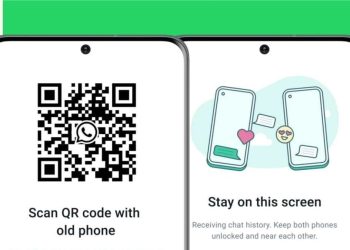
Last Updated: July 01, 2023, 11:16 ISTCalifornia, USATransferring chats between devices has become even easier. (Image: Meta)WhatsApp, Meta's instant messaging platform, now has a faster and more secure way to transfer chats from your old phone to a new one using a QR code. WhatsApp, Meta’s instant messaging platform, now has a faster and more secure way to transfer chats from your old phone to a new one using a QR code, locally, without the need for cloud. Meta CEO Mark Zuckerberg announced on Instagram that WhatsApp users will now be able to transfer their chats between devices (same OS only). He said that this will allow users to move their chats to a new phone “more privately without your chats ever leaving your devices.”📱📲 Now you can transfer your full chat history seamlessly, quickly and securely across the same operating systems without ever having to leave the app. Out today 👀 pic.twitter.com/UqNpyw8bCC— WhatsApp (@WhatsApp) June 30, 2023The video shared on the Meta Channel shows a user easily transferring chats from one Android device to another by scanning a QR code. This eliminates the need for third-party apps and transfers data locally—rather than using the cloud. For this to work—both devices

Read moreDetails

WhatsApp Introduces QR Code-Based Chat History Transfer for Easy Phone Switches

Highlights WhatsApp has unveiled a new feature that simplifies the process of transferring chat history from an old phone to a new one. To initiate the transfer, both the old and new phones should be powered on and connected to the same Wi-Fi network. This new local transfer method marks the company's first step in offering a streamlined solution for such migrations. WhatsApp has unveiled a new feature that simplifies the process of transferring chat history from an old phone to a new one. The latest update introduces a QR code-based system, allowing users to seamlessly migrate their WhatsApp data when switching to a new device operating on the same system, whether it's iOS or Android. To initiate the transfer, both the old and new phones should be powered on and connected to the same Wi-Fi network. On the old phone, users can navigate to WhatsApp's Settings, select Chats, and then choose Chat Transfer. This will generate a unique QR code that can be scanned from the new phone to complete the transfer process. Compared to existing third-party solutions, WhatsApp's local data transfer method offers enhanced security measures. The encrypted data is shared exclusively between the two devices over the

Read moreDetails

How To Set Your WhatsApp Status Setting To Private To Avoid Accidental Status Posting

by JJ Eleff – DansDeals.com If you follow WhatsApp statuses, you’ve seen people mistakenly post something they didn’t intend to share. Whether it’s a private message, picture, or a kid typing gibberish, it happens. And if you don’t follow WhatsApp statuses, you may not know what it even is. If you never share a WhatsApp status, I strongly recommend doing the steps below on your phone to ensure you don’t fall victim to the accidental WhatsApp status share where all of your contacts can view what you accidentally posted. I know this article is nothing revolutionary, but with the number of times I’ve seen accidentals statuses posted, I figure it may help some people if I made this PSA. 1. Open WhatsApp and click on the Status section of the top menu: 2. Click on the three-dot menu button: 3. Select Status Privacy: 4. Select Only share with…: 5. From there, choose just 1 contact to share your status with. This should be someone you don’t care if they see an accidental status, be it a spouse, friend, parent, etc. And now you are set, even if you accidentally share a status in the future, that one contact is the

Read moreDetails

15 WhatsApp settings everyone should know | Evening Standard

WhatsApp is one of the main ways people keep in touch with friends and family around the world.With the messaging app releasing new updates at a steady rate, it can be difficult to keep track of its most useful features. To help out, we’ve rounded up 15 essential functions that may have passed you by.From options that keep your activity hidden from prying eyes to decluttering storage, here are the top WhatsApp tricks you should get acquainted with.How to hide your WhatsApp online statusWhen you want to delay replying to a message, you can essentially stop people from seeing that you’re online.To do so, head into settings, select privacy, and then choose ‘last seen’ and ‘online’. Here, you can choose to show your activity status to everyone, just your contacts, your contacts and additional numbers, or nobody.Keep in mind, hiding your online status will prevent you from seeing other people’s status as well.Hiding your WhatsApp status will also prevent you from seeing other people’s status, too / WhatsAppHow to stop people from adding you to WhatsApp groupsThough WhatsApp groups are a great way to keep in touch with multiple friends, they can quickly turn into a headache when the messages

Read moreDetails
Page 128 of 316 1 127 128 129 316

Welcome Back!

Login to your account below

Retrieve your password

Please enter your username or email address to reset your password.

Add New Playlist

Are you sure want to unlock this post?
Unlock left : 0
Are you sure want to cancel subscription?