Friday, November 13, 2026

Here is how you can create and edit WhatsApp Broadcast lists – Times Now

WhatsApp is arguably one of the most widely used apps in the world. The end-to-end encrypted instant messaging platform allows us to connect with other people from around the world. In addition to messaging, the app can also be used to share images, videos, and audio clips.If you are someone who is interested in sending the same message to multiple people at once, you can achieve the same by creating a broadcast list on WhatsApp. Here is how.How to create a broadcast list on WhatsApp for Android1. Open WhatsApp by tapping on the app icon on your device.2. Tap on the three-dot menu located in the upper right-hand corner of the screen.3. Click on the ‘New broadcast option’.4. Choose the users that you want to add to your broadcast list.5. Tap on the tick mark sign to add the contacts.After you have created a broadcast list, you can easily send a message on the broadcast list and everyone who is added will receive the same.It is important to note that when you send a message to the broadcast list, it will be sent to all the users in the list who have your number saved in their contact list. In…

Read moreDetails

Meta-owned messaging app working on optional subscription plan for business accounts

Photo : iStockMeta-owned messaging app WhatsApp is reportedly working on offering a subscription plan to business accounts. These subscription plans will be optional. It will provide additional features to business accounts. According to a report in WABetaInfo, WhatsApp is working to redesign the interface for the “Linked Device” section, exclusively for WhatsApp Business accounts. After subscribing to the plan, users will be able to add multiple devices to the account.It will allow different people using the same account to chat with customers in the same chat window. The plan is reserved only for business accounts. At present, we can link four devices to our account.After subscribing to the plan, users can link up to 10 devices. The Meta owned messaging app is likely to announce more features for business accounts in future. Notably, the app is free to use. Users need to subscribe only if they want additional benefits.as per the WABetaInfoa, the subscription plan is not available at present. It will be reportedly rolled out in future updates of the WhatsApp Business beta for Android and iOS.Earlier this week reports also surfaced that the messaging app added an option to hide your 'last seen' from specific contacts. Apart from…

Read moreDetails

Whatsapp message to a non-saved contact | MacRumors Forums

In an older iOS version (14 or so) I remember that I just had to keep pressed on "message" inside the "recent call" or "contact tab" to send directly a whatsapp, telegram or any other chap app directly. Now, in iOS 15 seems that this works only for "calls" or "video-calls". Is it only my phone having got the issue or also on your phone you cannot send a chat to a non saved contact?

Read moreDetails

How to Stop WhatsApp from Automatically Saving Photos on Android/iPhone – Bollyinside

This tutorial is about the How to Stop WhatsApp from Automatically Saving Photos on Android/iPhone. We will try our best so that you understand this guide. I hope you like this blog How to Stop WhatsApp from Automatically Saving Photos on Android/iPhone. If your answer is yes then please do share after reading this. Table of contents Check How to Stop WhatsApp from Automatically Saving Photos on Android/iPhoneWhatsApp currently has over a billion users where people send messages, share photos, videos, locations and other files with their contacts. Since people have been getting WhatsApp app from Play Store and tracking photos of their contacts for a long time, they are looking for ways to prevent WhatsApp from storing images in gallery. Because there may be private photos or other personal photos that you don’t want others to see when you share your phone with someone.Messaging apps like WhatsApp are great for sharing photos and videos you’ve taken with your phone. But not all photos and videos should automatically download to your camera roll. If everything downloaded automatically, your camera roll would soon overflow and you’d spend a lot of time deleting photos and videos. So how can you stop WhatsApp…

Read moreDetails

Do you use WhatsApp a lot? know these tricks that will help you save battery while you are in the app

For Jean Lucas Bello WhatsApp is the most widely used instant messaging application on the planet and despite being a communication tool, it has also become an essential platform for developing work teams. Excessive use of the platform can cause great wear on the battery of the equipment you are using. That is why below you will learn some tricks that you can employ to save battery while you are in the application owned by Meta. Note: It is important to note that to carry out these tricks you are only going to use WhatsApp. In other words, you will not need external or third-party tools for this task. Save battery while using WhatsApp Battery saving goes through reduce the impact of the cell phone screen Y disabling background activities, which sometimes affects the operation of the mobile device. Therefore, the first trick is to activate the Dark Mode on your phone. The step by step is as follows: Step 1: Open the app on the phone. Step 2: Go to the application menu button. It’s the vertical three-dot icon in the upper right. Step…

Read moreDetails

WhatsApp Group Polls feature is in testing and here's how it works | Digit

WhatsApp polling will help group members finalize the option for any course of action.Meta is arming up WhatsApp with features, some entirely new while some borrowed from its other apps like Instagram and Facebook. Whatever the case may be, measures like Polls are likely to improve user engagement within the instant messaging app. Coming to the titular feature — Polls, WhatsApp seems to be testing it for a while. It was first discovered in the WhatsApp beta for iOS v22.9.0.70 and now we have some screenshots of the same, courtesy of WhatsApp leak specialist WABetaInfo. WABetaInfo was also the one to spot the Polls feature on WhatsApp for iOS beta. Although, now it isn’t available for beta testers either. Let’s take a look at how the whole polling feature works: How WhatsApp Group Chat Polls work WhatsApp Polls could be available within the Plus (+) or Attachment Pin menu present on the bottom portion of the chat screen. Choosing this, you should be able to add the question and options. This is just a guess as we have only got an image of the in-app Poll interface.  You can see in the above image that the poll bubble is bigger than the…

Read moreDetails

New Communities feature for WhatsApp group chats inbound but first, other tweaks are coming – Stuff

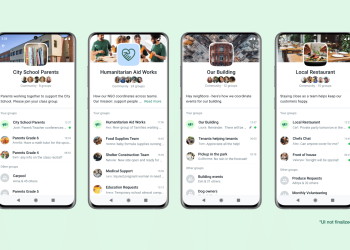
Meta-owned, WhatsApp has announced a new Communities feature, which provides additional features for group chats. Features like file sharing for sizes up to 2GB, emoji reactions, an admin delete function, and group calls of up to 32 people are also inbound. Which sounds like a cacophony, but is great if you don’t want to read all those texts, we guess.The company shared the following video on its WhatsApp Twitter account.📣 We’re excited to announce a new feature rolling out later this year called Communities!With Communities, you’ll be able to bring related groups together in a way that helps you organize meaningful connections easily and privately. pic.twitter.com/eatAZQCmc3— WhatsApp (@WhatsApp) April 14, 2022According to the company, more people are relying on WhatsApp groups to get information across. It’s this that has apparently prompted the development and launch of Communities.“Organisations like schools, local clubs, and non-profit organisations now rely on WhatsApp to communicate securely and get things done. Especially since the pandemic forced us all to find creative ways to work together while apart. Given lots of feedback we’ve received, we think there’s more we can do to make it easier to help people manage these busy conversations among these kinds of groups.”What’s…

Read moreDetails

WhatsApp may soon allow sending messages from smart glasses – Times of India

Ray-Ban Stories users will soon be able to speak to their smart glasses to send a WhatsApp message without having to bring out their smartphone. A new APK teardown of the WhatsApp for Android app suggests that this feature may become a reality in the coming days. However, the feature will be locked to Ray-Ban Stories smart glasses, as it seems to be a feature exclusive to Facebook Assistant. According to an XDA Developers report, strings of data that suggests this feature were spotted in the latest WhatsApp beta 2.22.9.13. The data spotted by some users hints at the feature being developed to dictate messages through Facebook Assistant on the specific wearable line. The data just mentions an Assistant, however, the report claims that it is likely talking about the Facebook Assistant and not the one developed by Google. The report mentions that this upcoming feature will allow Ray-Ban Stories users to dictate messages into the microphone on the smart glasses. Users will be able to message a friend on WhatsApp while they are walking down the street without even touching their phones as they can instruct Facebook Assistant to do the same. The report also mentions graphics that include…

Read moreDetails

WhatsApp testa nova função para status 'visto por último'; veja detalhes | Apps | TechTudo

Novas funções de privacidade estão em testes e, caso adicionadas à versão oficial do app, permitirão tirar visto por último do WhatsApp e ocultar foto de perfil e bio O WhatsApp está testando novos recursos na ferramenta "visto por último", segundo informou o site especializado WABetaInfo. A novidade, que está em testes desde o último sábado (16) na versão beta 22.9.0.70 do aplicativo para Android e iPhone (iOS), permitiria ocultar o status para contatos específicos do mensageiro. Além disso, entre as novas funções estariam ainda algumas mudanças às configurações de privacidade da foto e da bio dos usuários. Ainda não há previsão e/ou certeza sobre o lançamento da novidade na versão estável do app WhatsApp testa nova função para ocultar o status 'visto por último'; veja se você pode participar — Foto: Anna Kellen Bull/TechTudo Problema no QR code do Whatsapp? Veja como resolver no Fórum do TechTudo. O "Visto Por Último" é um recurso do WhatsApp que mostra o horário do último acesso do usuário no mensageiro. Por questões de segurança e privacidade, muitos usuários optam por ocultar essa informação de todos os amigos ou desconhecidos. Com a nova ferramenta, será possível escolher para quais pessoas, entre seus contatos,…

Read moreDetails
Page 232 of 337 1 … 231 232 233 … 337

Welcome Back!

Login to your account below

Retrieve your password

Please enter your username or email address to reset your password.

Add New Playlist

Are you sure want to unlock this post?
Unlock left : 0
Are you sure want to cancel subscription?