
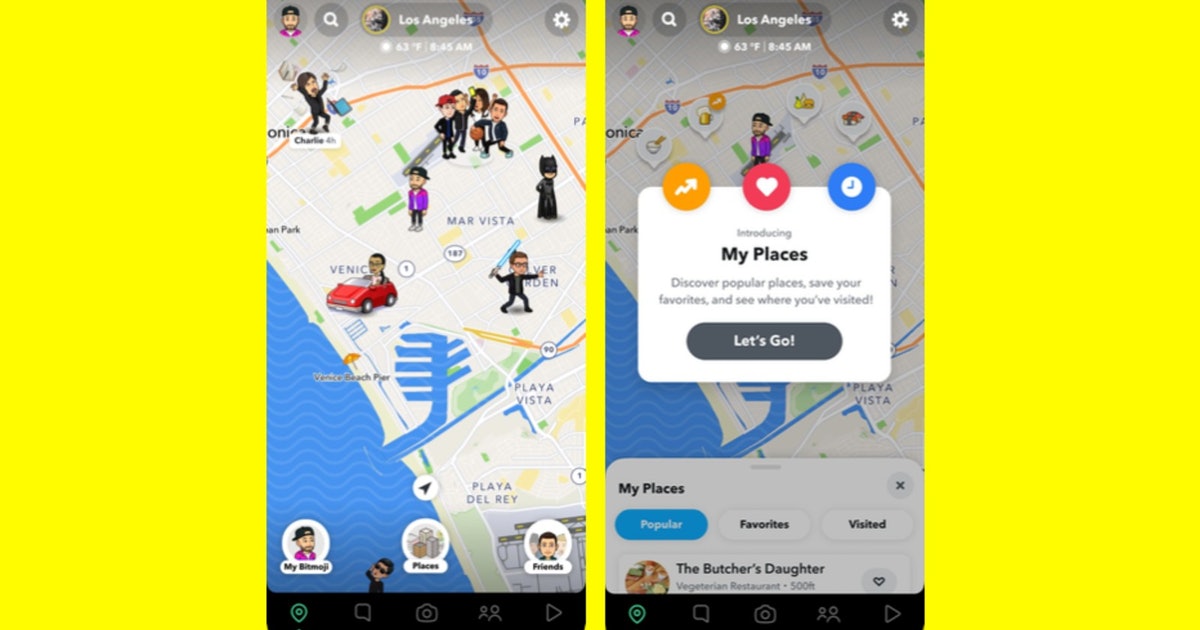
TechYum!Courtesy of SnapchatFoodies, listen up, because there’s a new way to find the best restaurants while browsing your Snap Map. Snapchat launched My Places on July 28, a new Snap Map feature that allows you to get personalized recommendations for local restaurants and keep track of all your favorite eats. If you’re ready to take your foodie adventures to the next level, here’s how to use Snap Map’s My Places Tray to visit new restaurants.Since Snapchat’s Snap Map My Places began rolling out to global users at the end of July, you’ll want to know all the details so that you can get started on your food tour. My Places helps users filter Snap Map’s over 30 million businesses so that they can find restaurants that best suit their personalized preferences.First things first, you’ll want to head to the My Places Tray by opening up Snap Map and tapping the “Places” icon at the very bottom of the map. Once you’ve open the My Places Tray, you’ll see three main tabs — Popular, Favorites, and Visited — which will each show you different restaurants in list form as well as in marked locations on the Snap Map. The Popular tab…
Read More

Tuesday, October 6, 2026

Tuesday, October 6, 2026
Snapchat's New Places Update Makes It Super Easy To Find Cool Restaurants

ADVERTISEMENT
- Trending
- Comments
- Latest








We bring you the best news, updates, reviews, and events coverage surrounding the worlds top Social Network Companies.
