
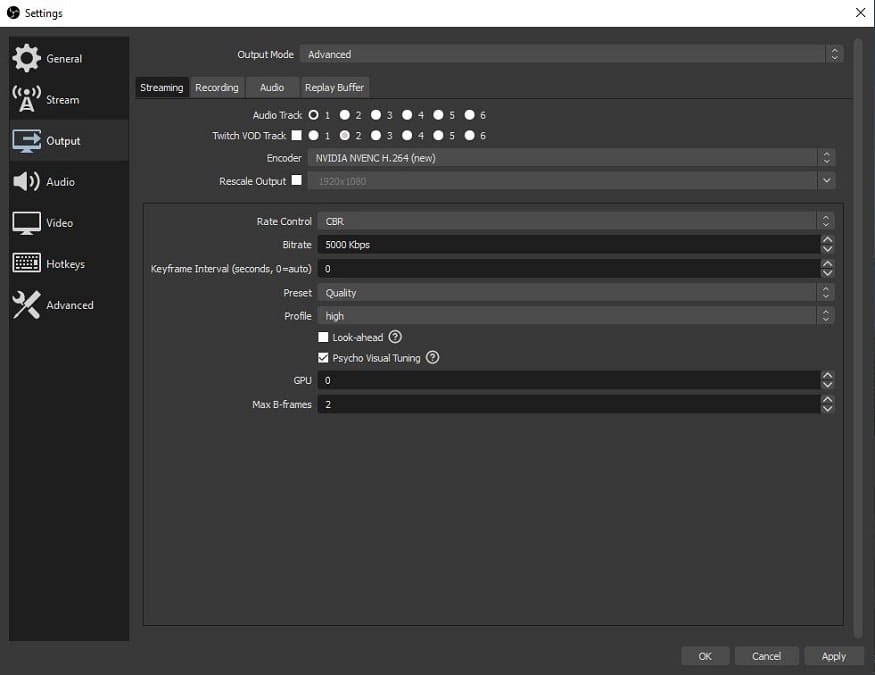
If you are streaming on Twitch, you always want to look your best. While most of the elements on your stream are under your control, such as what your overlays show and how you look, the settings that your stream software uses will determine how smooth your broadcast is. The quality aspect of your feed can make a difference to new visitors seeing your stream for the first time. If it looks good, viewers are more likely to come back. However, knowing what settings are ideal for your stream set up can be daunting, especially to those who are new to streaming, or without a level of technical know-how. It doesn’t need to be, and so here are all the settings that you need to worry about in OBS Studio and Streamlabs OBS. Output In the settings of your software, head into the Output settings and then onto the Streaming tab. Encoder If you are using a computer that contains a recent Nvidia graphics card, you may have access to the NVENC encoder, Nvidia’s protocol which can help to offload much of the work that OBS does to your graphics card rather than your processor. When the option is available,…
Read More

Sunday, October 11, 2026

Sunday, October 11, 2026
The best OBS Settings for Twitch Streaming

ADVERTISEMENT
- Trending
- Comments
- Latest







We bring you the best news, updates, reviews, and events coverage surrounding the worlds top Social Network Companies.
